Smarter attributes for better insight into utilisation and states

The Witness 28 release brings a practical upgrade to how we work with attributes in simulation models. The focus is to make it easier to see what’s happening to parts as they move through a system, but the State Attributes can also be used on Machines.
This blog introduces State Attributes, along with new functions and reporting improvements that help you track and understand utilisation.
What Are State Attributes?
State Attributes are a new type of attribute that can only take values from a predefined list of states.
Just as importantly, a State Attribute can only be in one state at any given time.
This might sound like a small change, but it makes a big difference. Instead of assigning any value to the attribute in Actions that fit with the data type, you can now define clear custom states such as in this example, where we define the states a Part can be in to represent the area in the process.
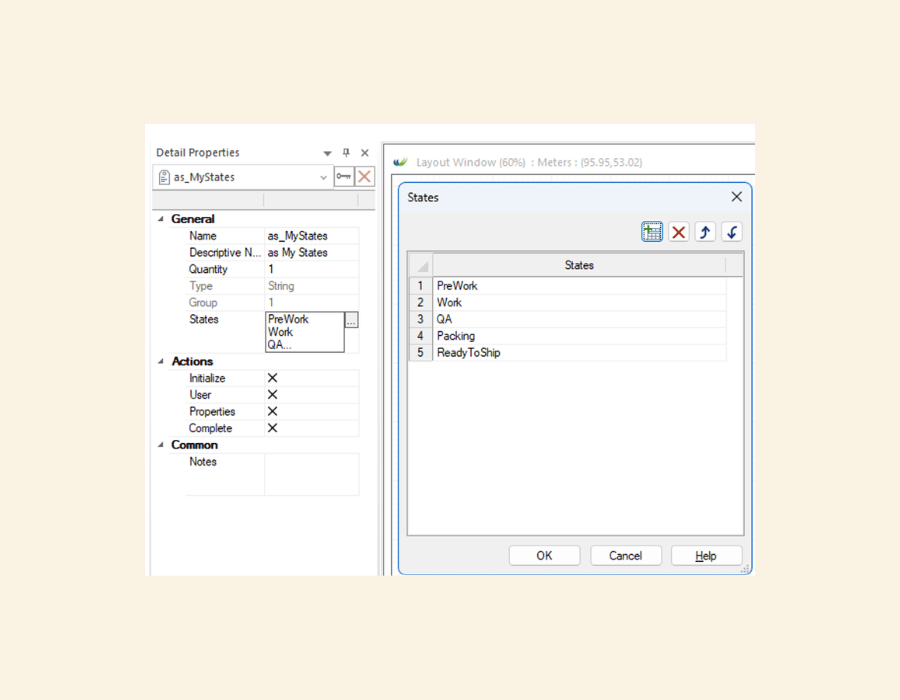
Figure 1: Custom State Attribute – as_MyStates
Setting State
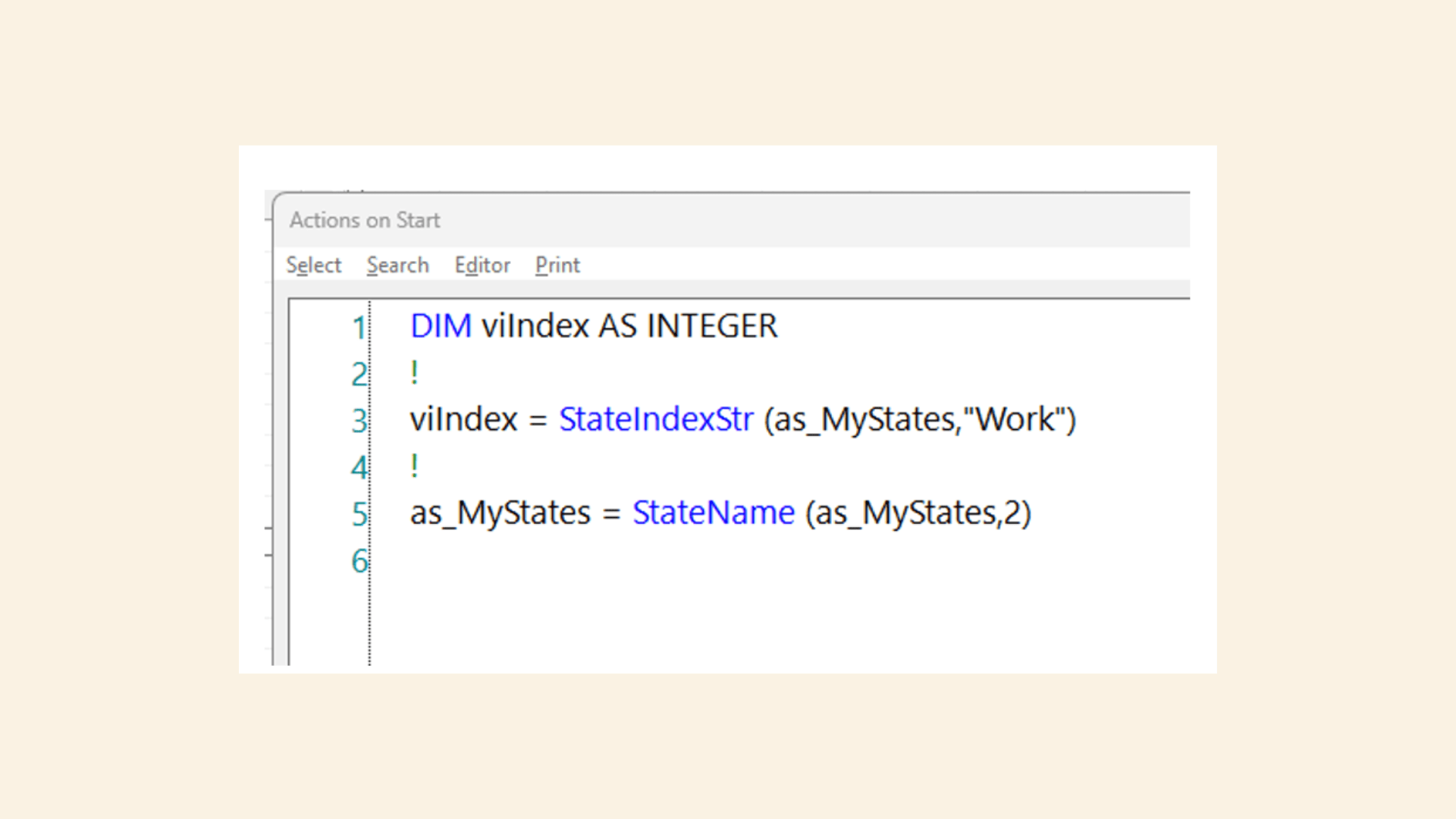
With defined states in place for the State Attributes, you can now set the attribute in any Actions you wish. If you have defined the State Attribute as string, as in the example, then you can check what that string is with the StateName function if you know the index, or conversely if you know the string but not the index, you can use StateIndexStr (or the equivalent StateIndexNum, or StateIndexName).
Tracking Utilisation More Clearly
You can now track how long parts spend in each of your custom states.
This gives you a much clearer picture of how your system is behaving, showing:
- Where parts are spending most of their time
- Where delays are building up
- Where lead times come from in terms of value-added processes and non-value added or waiting times
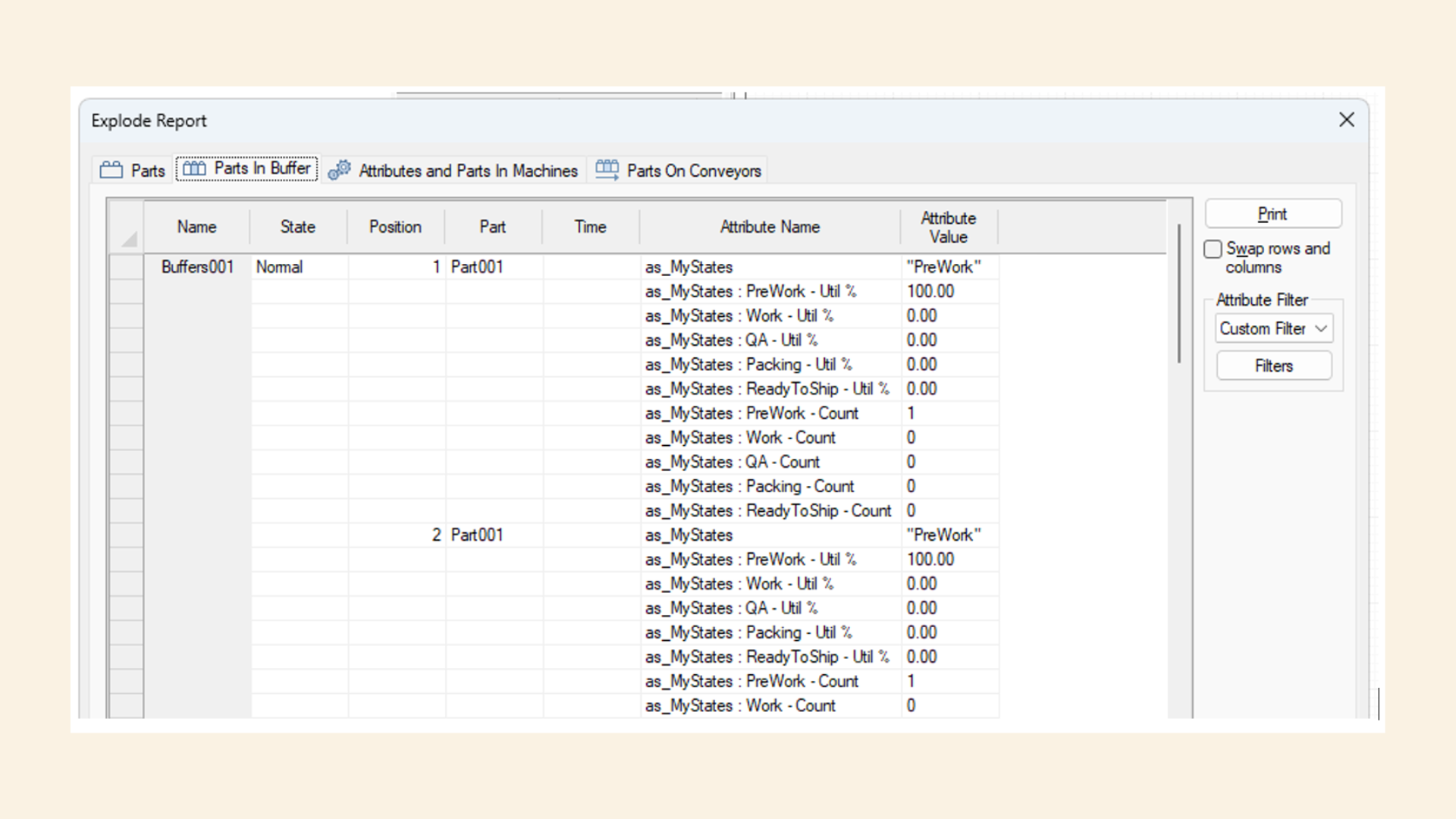
Explode reporting has been updated to include State Attributes. You can now see the percentage of time spent in each state for each part and the number of times each part has been in each state:
New Functions for Working with States
Several new functions have been added to help you work with State Attributes.
Understanding State Data
- StateUtil – Returns utilization for a specific state for a part
- StateCount – Gives the number of times a part has changed to a state
- StateIndexStr (& Num and Name) – Lets you work with state indices programmatically
ACME.mod Fixtures
Updated ACME.mod has a new state attribute Model.as_FixtureState to demonstrate.
If you’re getting started, this example is worth exploring. View the Used Report on the State Attribute to see how it is changed and the Explode Report on any element with Parts present to see the statistics.
Machine States
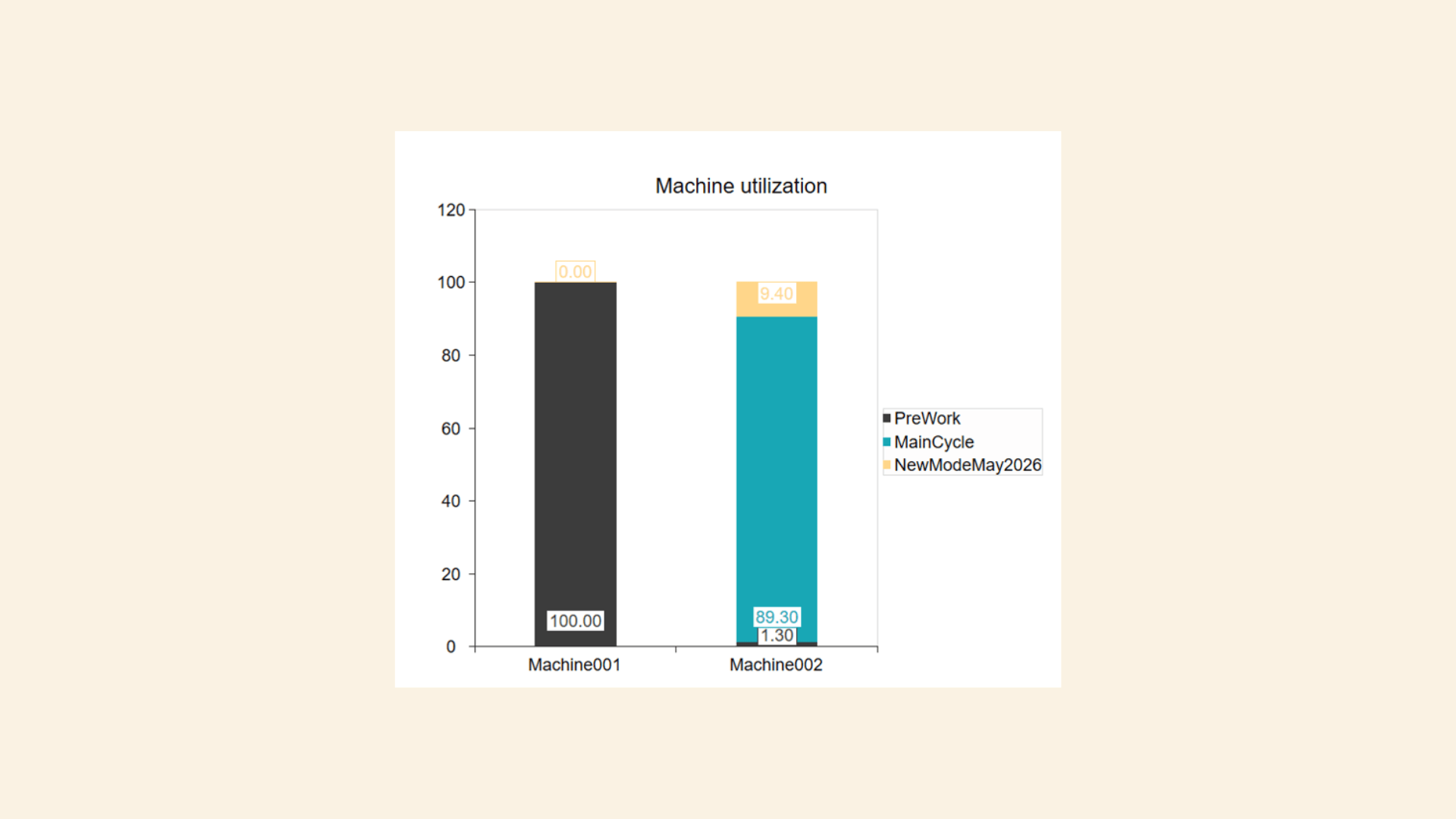
The great news with State Attributes is that they can also be used as Group 0 attributes which can be used on other elements such as Machines, allowing you to specify your own Machine states. This gives you the ability to replicate what PUtil and SUtil provide, but for your own state definitions. For example, this could be used to track how much time a machine spends processing parts of different types.
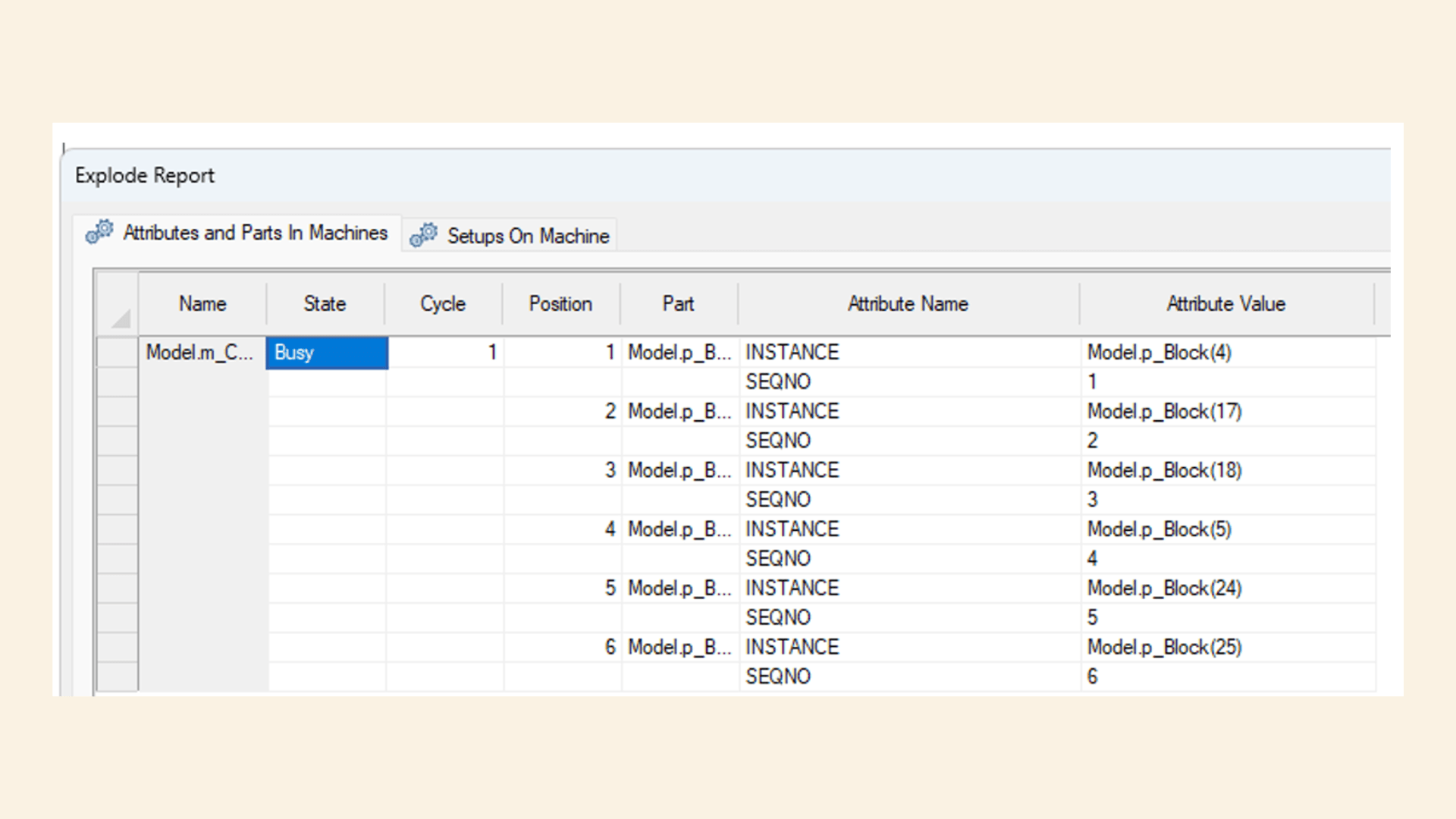
INSTANCE and SEQNO
State tracking also works alongside two new system attributes:
- INSTANCE – A unique identifier for each part
- SEQNO – The identifier of the order in which parts were created
How INSTANCE and SEQNO work in practice
Every part in the model is given an INSTANCE value when it is created. This is a string made up of the part name and a number in brackets.
For example: Pallet(123)
That number is assigned automatically by Witness, and no two parts in the model will share it at the same time. You don’t set or manage this yourself – it’s read-only.
The numbers won’t always be sequential because once a part leaves the model, its number can be reused later. Think of INSTANCE as a temporary unique ID while the part is in the system.
SEQNO is an integer that tracks the order in which parts of the same type enter the model. Each part type has its own counter.
This means SEQNO is unique within a part type, not across the whole model. Like INSTANCE, SEQNO is assigned automatically and is read-only.
Why INSTANCE and SEQNO are useful
INSTANCE gives you a reliable way to track and compare specific parts as they move through your model. You can store the “name” of the part in name variable and address it later without knowing which element it currently occupies. For example, record the INSTANCE in some Actions:
Vn_PartName = INSTANCE
Where INSTANCE might return Pallet(123)
And later use that to set the parts’ other attributes:
Vn_PartName:ai_Release = 1
SEQNO is helpful when you want to track all the parts of a type, and especially when you need a row number to store data about that part in a datatable.
Iterator Functions
New iterator functions make it easier to loop through elements and analyse states:
- EltFirstByType() / EltNextByType() – Use these in a loop through elements of a specific type
- EltFirst() / EltNext() – Use these in a loop through Part Instances of a specific part type
These are useful when building custom logic or reports that need to scan across multiple elements of the same type, or when the system variable N doesn’t apply.
State Validation and Lookup
To help avoid errors and keep models consistent, a set of supporting functions is included in Witness 28:
- MaxState() – Returns the maximum number of states for an element (to loop up to)
- ValidState() – Checks if a state is valid (not all states lower than the max are valid states)
- StateName() – Returns the name of a state – useful for reporting
These will make models reporting more robust and so that Actions code can be generic.
Why This Update Matters
This release makes it easier to describe what is happening in your model in a clear, structured way.
You can now:
- Track your own definition of utilization without extra workarounds
- Build cleaner logic using defined states
- Understand system behaviour more quickly
- Produce reports that are easier to explain to others
Final Thoughts
Witness 28 improves how attributes are used: to define states, track them properly, and use that information to understand your system.
If you’ve ever struggled to explain where time is being spent in a model, this update should make that much simpler.